When we use frameworks like express, HTTP feels simple: a request comes in, a handler runs, a response goes out.
But that simplicity is an illusion.
I built a minimal HTTP server (and later, a reverse proxy) from scratch to understand what actually happens before frameworks step in — and where correctness, fairness, and stability really come from.
This article is not about building a production server.
It’s about understanding the constraints that shape real systems.
Code: https://github.com/abel123code/zeroHTTP.git
The first realization
TCP gives you bytes, not requests
At the lowest level, a server does not receive “requests”.
It receives bytes.
bytes are made out of 8 bits, where each bit is either 0 or 1. Think of it as a sequence of 8 ‘1’ or ‘0’ in any order.
e.g 00011100
TCP is a byte stream. It has:
- no message boundaries
- no concept of headers or bodies
- no guarantee that one read equals one write on the other side
In Node.js, this looks like:
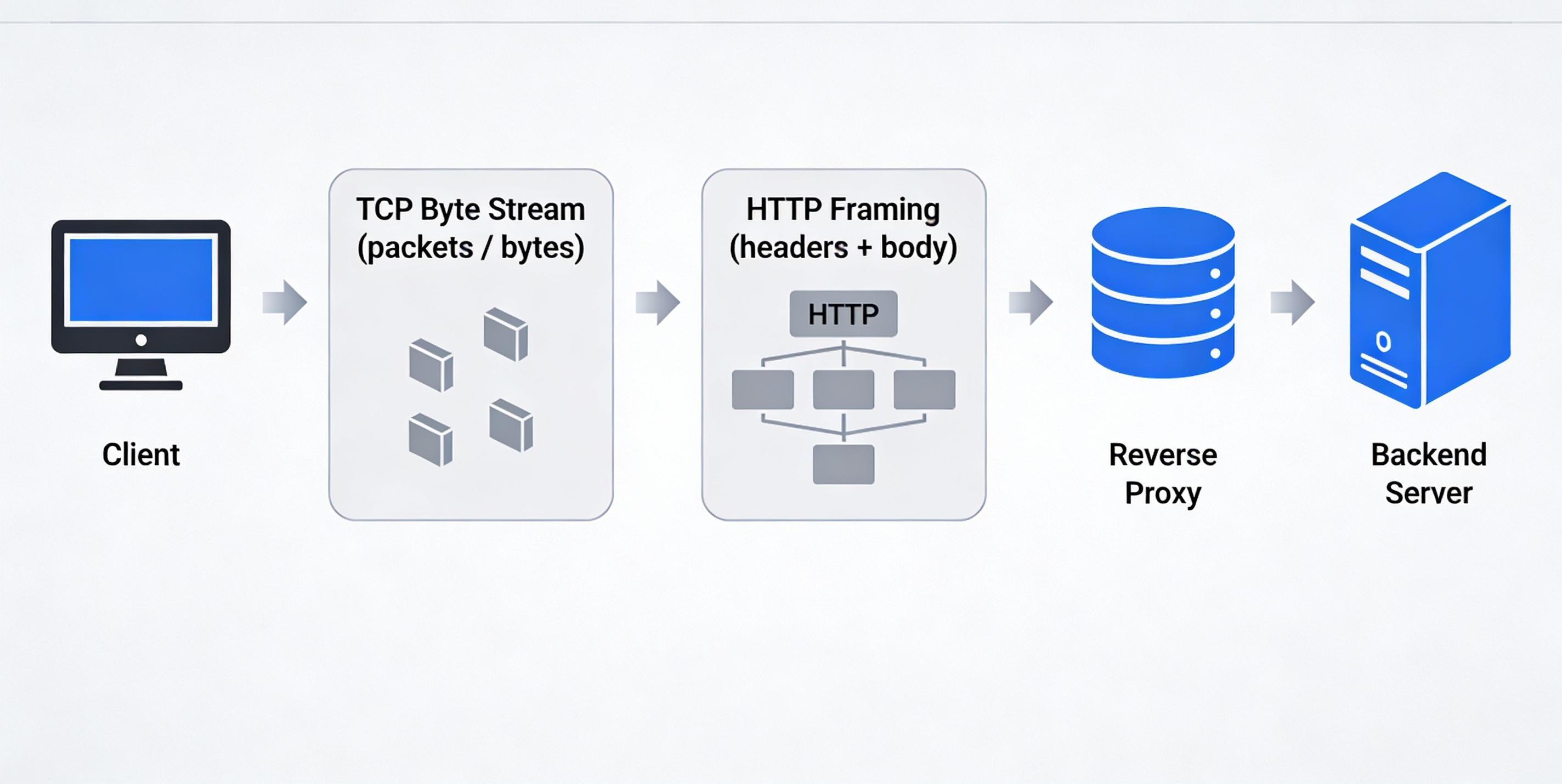
Client (curl / browser)
   ↓
TCP connection (kernel handles packets)
   ↓
net.Socket (stream abstraction)
   ↓
"data" events (Buffer = raw bytes)
Everything else — HTTP, routing, rate limiting — is built on top of this stream.
HTTP is just a standard for structuring/organizing data
HTTP exists to answer one question:
How do we agree on where one request ends and the next begins?
The answer is framing rules.
Anatomy of a HTTP request:
<request-line>\r\n
<header-line>\r\n
<header-line>\r\n
\r\n              ← end of headers
<body bytes>      ← optional

Example:
POST /articles/ HTTP/1.1
Host: codeka.io
Content-Type: application/json
Content-Length: 31

{"title":"my beautiful article"}
The key delimiter is:
\r\n\r\n
From curl command to raw HTTP bytes
When we type a curl command, it’s easy to think we’re “sending an HTTP request”.
In reality, we’re doing something more indirect.
We’re giving instructions to a program, and that program is responsible for constructing the raw HTTP bytes that will eventually be sent over a TCP connection.
For example, when we run:
curl -X POST https://codeka.io/articles/ \
  -H"Host: codeka.io" \
  -H"Content-Type: application/json" \
  -H"Content-Length: 31" \
  -d'{"title":"my beautiful article"}'
What actually happens is:
-
curlparses the command-line flags -
It translates them into:
HTTP method -> request path -> set of headers -> optional request bod -
It serializes all of that into plain text bytes, following HTTP’s framing rules
-
Those bytes are written into a TCP socket
The server never sees the curl command.
It only ever sees the resulting byte stream.
POST /articles/ HTTP/1.1\r\n
Host: codeka.io\r\n
Content-Type: application/json\r\n
Content-Length: 31\r\n
\r\n
{"title":"my beautiful article"}
How do you know one HTTP request is complete?
There are only two cases:
Case 1: No body
If there is no Content-Length, the request ends at:
\r\n\r\n
Example would be a GET request where no content is being sent:
GET /health HTTP/1.1\r\n
Host: localhost\r\n
\r\n
Case 2: Request with body
If Content-Length: N exists, the request is complete only when:
headers + Nbody bytes
Example:
POST /echo HTTP/1.1\r\n
Host: localhost\r\n
Content-Length: 5\r\n
\r\n
hello
This framing rule drives all correct parsing logic.
Phase 1: Accepting TCP connections (no HTTP yet)
The first step was simply proving I could:
- listen on a port
- accept TCP connections
- read bytes
- write bytes back
At this stage, my server could send "hello" — but curl wouldn’t display it.
Why?
Because the response was not valid HTTP.
Phase 2: The anatomy of a valid HTTP response
For a client to accept a response, the server must send:
HTTP/1.1 200 OK\r\n      -> 1.Status line
Content-Length: 5\r\n    -> 2. Content length
\r\n                     -> 3. Blank line
hello                    -> 4. Body
This is the smallest valid HTTP response.
Until this structure exists, clients will ignore whatever bytes you send.
This phase reinforced a key idea:
HTTP is not magic — it’s a strict text-based protocol layered on TCP.
Phase 3: Parsing the request line and routing
Once a valid response exists, the next step is turning raw bytes into meaning.
Goal: turn bytes into {method, path, version}.
When you run curl -v http://localhost:3000/health , curl sends bytes over TCP that looks like
GET /health HTTP/1.1\r\n
Host: localhost:3000\r\n
User-Agent: curl/8.x\r\n
Accept: */*\r\n
\r\n
The server typically does something like:
const text = buffer.toString("utf8");
Now the bytes become a single string:
"GET /health HTTP/1.1\r\nHost: localhost:3000\r\nUser-Agent: curl/8.x\r\nAccept: */*\r\n\r\n"
We can simply split by ‘\r\n\r\n’ :
[
  "GET /health HTTP/1.1",
  "Host: localhost:3000",
  "User-Agent: curl/8.x",
  "Accept: */*",
  "",
  ""
]
From here it is manageable to get the METHOD PATH VERSION from the first item in the array
This is enough to:
- route
- reject invalid methods
- apply early policies (rate limit by route, block methods, etc.)
Phase 4: Parsing headers (building a real request object)
Headers add metadata to a request:
Host: localhost
User-Agent: curl/8.6.0
Accept: */*
They must be:
- parsed line by line
- stored case-insensitively
- read only after headers are complete
At this point, the server can construct a meaningful request object:
{
	method:"GET",
	path:"/health",
	headers: {
		host:"localhost",
		"user-agent":"curl/8.6.0",
		accept:"*/*"
	}
}
Phase 5: Handling request bodies with Content-Length
For POST requests, headers alone are not enough.
The server must:
-
detect
Content-Length -
wait until exactly that many body bytes arrive
-
e.g a client sends
POST /echo HTTP/1.1\r\n Host: localhost:3000\r\n Content-Length: 5\r\n \r\n hello -
hence you need to wait till
‘hello’comes in fully before handling the request
-
-
treat anything less as an incomplete request
In pseudocode:
buffer += incomingChunk;

if (headersComplete && bufferBodyLength < contentLength) {
  return; // wait for more data.
}

if (headersComplete && bufferBodyLength === contentLength) {
  handleRequest(buffer);
}
This is where a critical assumption breaks:
One data event does NOT equal one request. TCP is a byte stream, not a message protocol.
Phase 6: TCP is a stream — partial reads are normal
Since TCP is a byte stream, it may split a request across multiple reads:
- headers may arrive in pieces
- body may arrive slowly
- multiple requests may arrive back-to-back
To handle this correctly, each connection needs its own buffer.
The buffer accumulates bytes until:
- headers are complete (using ‘/r/n/r/n’ as the check)
- body length matches
Content-Length
Only then is a request safe to process.
Importantly:
- each socket has its own buffer
- one socket = one connection
- bytes received on a socket come from only that peer
So:
- Client A’s bytes → socket A → buffer A
- Client B’s bytes → socket B → buffer B
There is no shared buffer across clients.
This preserves isolation.
Concurrency without threads (Node’s model)
Node.js handles concurrency via an event loop.
Here is an analogy on concurrency using restaurants.
❌ Non-concurrent (blocking) restaurant A
The chef does this:
- Takes Order A
- Cooks Order A without stopping
- Serves Order A
- Only then talks to Order B
If Order A takes 10 minutes:
- Everyone else waits
- Restaurant looks “stuck”
This is a blocking server.
✅ Concurrent restaurant B (Node.js model)
The chef does this instead:
- Takes Order A → puts it on stove → waits
- While Order A cooks, takes Order B
- While B cooks, takes Order C
- When A is ready, serves A
- When B is ready, serves B
Takeaway:
- Chef is one person
- Chef is not cooking two things at the exact same millisecond
- But multiple orders are in progress
Concurrency does not mean doing multiple things at the same time.
It means making progress on multiple things without blocking.
The key pattern is:
socket.on("data", (chunk) => {
  buffer += chunk;

  while (true) {
    if (!fullRequestInBuffer) {
      return; // yield back to event loop
    }

    // parse one request
    // consume bytes
    // respond
  }
});
By returning early when a request is incomplete:
- the event loop stays free
- other sockets can be processed
- concurrency is preserved
Guarding the server: correctness is not enough
Once a server accepts bytes from the network, it has accepted risk.
Before even parsing a request, the server must enforce connection guards.
Examples:
- Header timeout
- client sends headers too slowly →
408 Request Timeout
- client sends headers too slowly →
- Body timeout
- headers arrive, but body never finishes
- Idle timeout
- connection stays open doing nothing
- Size limits
- headers or body exceed reasonable limits
These guards must live in the socket.on("data") path because only there do you have:
- raw bytes
- timing between chunks
- per-connection context
Guards protect server stability, not fairness.
Rate limiting with the Token Bucket Algorithm
Once a request is valid and safe, the next question is:
Should this client be allowed to consume resources right now?
This is where rate limiting belongs.
Token bucket algorithm:
The token bucket algorithm models burstable but bounded traffic.
Each client is given:
- a bucket with a maximum capacity
- tokens that refill over time
Rules:
- Each request costs one token
- Tokens refill continuously
- If no tokens remain → reject with
429 Too Many Requests
Logic behind Token Bucket Algo:
Let’s say:
capacity= 10 tokensrefillRate= 1 token / second
On each request:
-
Compute elapsed time:
delta = now - lastRefillTime -
Refill tokens:
tokens += delta * refillRate tokens = min(tokens, capacity) -
If tokens >= 1:
- tokens -= 1
- allow request
-
Else:
- reject request (429)
-
Update
lastRefillTime = now
This is the entire algorithm.
It is important to note that we are not:
- iterating over all IP addresses
- refilling buckets on a fixed interval
- running a per-second background task
Unlike fixed windows, token bucket avoids sharp traffic spikes at boundaries.
Where rate limiting belongs in the lifecycle
The correct order is:
TCP bytes
→ connection guards (timeouts / size limits)
→ parse HTTP request
→ ratelimit
→ routeand handle
→ response
Why this matters:
- guards protect resources
- rate limiting protects fairness
- parsing must come before either
A note on production systems
Real-world systems are rarely a simple client → server setup.
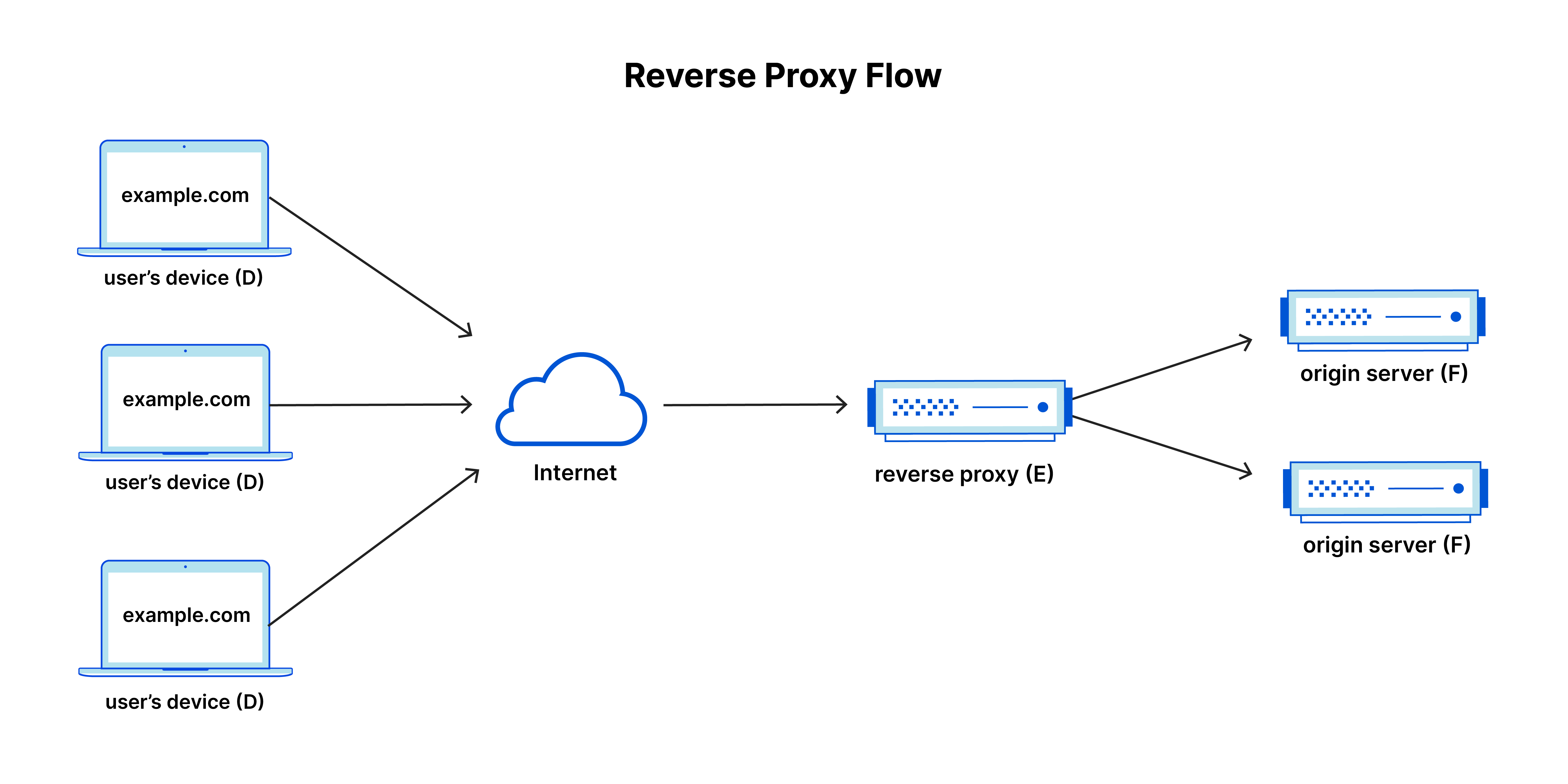
In production, HTTP servers are almost always placed behind a reverse proxy.
Clients talk to the proxy, not the application servers directly.
The proxy’s role is not application logic, but traffic control:
- route requests across multiple backends
- remove unhealthy servers from rotation
- enforce timeouts and size limits
- absorb slow or misbehaving clients
- protect backend resources
Importantly, the proxy operates at the same level discussed in this article:
it works with raw HTTP framing over TCP, making decisions as soon as headers are available and streaming bytes when possible.
This separation allows application servers to focus on business logic, while the proxy handles reliability and safety concerns.
Why this matters
Understanding how HTTP works at the byte and framing level makes proxy behavior intuitive rather than magical.
The same rules apply:
- headers determine intent
- bodies are untrusted and potentially large
- timeouts and limits must be enforced before work is done
The difference is where those rules are applied.
What this project taught me about system design
- HTTP correctness comes from framing rules, not libraries
- Most complexity exists to handle slow or malicious clients
- Streaming is about memory safety, not speed
- Backpressure preserves stability under load
- Fairness is a separate concern from correctness
- Proxies exist to protect backends, not replace them
Frameworks hide this complexity — but the complexity still exists.
Understanding it changes how you design systems.
Closing thought
Building this server was not about replacing existing tools.
It was about understanding why they look the way they do.
That understanding is what I’ll carry into larger systems.
Related Articles

Building a Git Clone from Scratch (and Finally Understanding Git)
A deep dive into Git internals by building a tiny Git clone from first principles - blobs, trees, commits, refs, and checkout.

I Thought Building Voice AI Was About Technology. I Was Wrong.
A reflection on building three voice AI agents at Functional AI - and how designing AI for human lives changed the way I think.